MobiStudio

MobiStudio

Full control over AI training.
A fully controllable annotation environment.

MobiStudio is a Japanese machine vision AI labelling software based on Label Studio. It is a more customizable alternative to Roboflow: we work directly with each client to introduce tailored labeling tools built around their workflow. This high-performance labeling tool delivers flexible UI design, real-time AI assistance, and team management in one platform.
CUSTOMIZABLE UI Fully Customizable UI

Design the interface freely according to project requirements.
Optimize everything from button placement to menu structure and display settings for your workflow.

Custom Button Creation

Freely add buttons needed for your project. Configure label types, shortcuts, and placement to match your requirements.

Menu & Settings Customization

Flexibly modify menu structure and behavior settings per project. Freely configure image display height and label preview count.

Auto Navigation

Configure automatic page navigation (next/previous) after annotation submission. Reduces manual operations during work, maintaining focus.

Place the tools your work needs — brush size, fast lasso fill, and more — into the panel per project, building the optimal workspace for your field workflow.

AI-ASSISTED TRAINING Real-Time AI Training

Train AI models during annotation work, letting AI assist with the remaining tasks.
Model accuracy improves at each checkpoint, and manual workload decreases progressively.

Manual Annotation
100% Human
1st Training
Checkpoint reached
AI + Human
50% AI / 50% Human
2nd Training
Re-train at 250 images
AI-Driven
95% AI / 5% Human

Progressive Learning Approach

Training runs at each checkpoint. As model accuracy improves, the manual annotation ratio decreases. Even for a 1,000-image dataset, actual manual work can be limited to approximately the first 150 images.

Create & Download Your Own AI Models

Train and create your own AI models directly from the MobiStudio interface, then download the trained model and use it in your own applications. No external pipeline required — go from labeling to a deployable machine vision model in one place.

Mask-Vector Conversion

Seamlessly convert between segmentation masks and vector data, and vice versa. Choose the optimal data format for your use case.

Example: Annotating 1,000 Images

Phase 1 Manually annotate 150 images, then run 1st model training
Phase 2 Review and correct AI predictions (50% human / 50% AI), re-train at 250 images
Phase 3 High-accuracy AI handles majority (95% AI / 5% human review), complete
Result Up to 80% reduction in work time

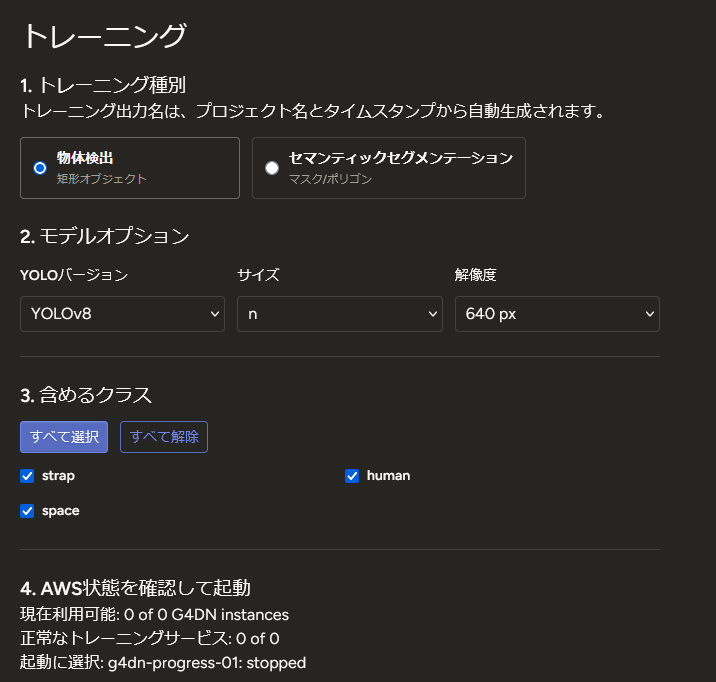
Train object-detection and semantic-segmentation models directly from the screen. Just choose the YOLO version, size, resolution, and target classes to start training.

MobiStudio training settings (object detection, YOLO, class selection)

VECTOR DETECTION Object Detection with Vector Polygons

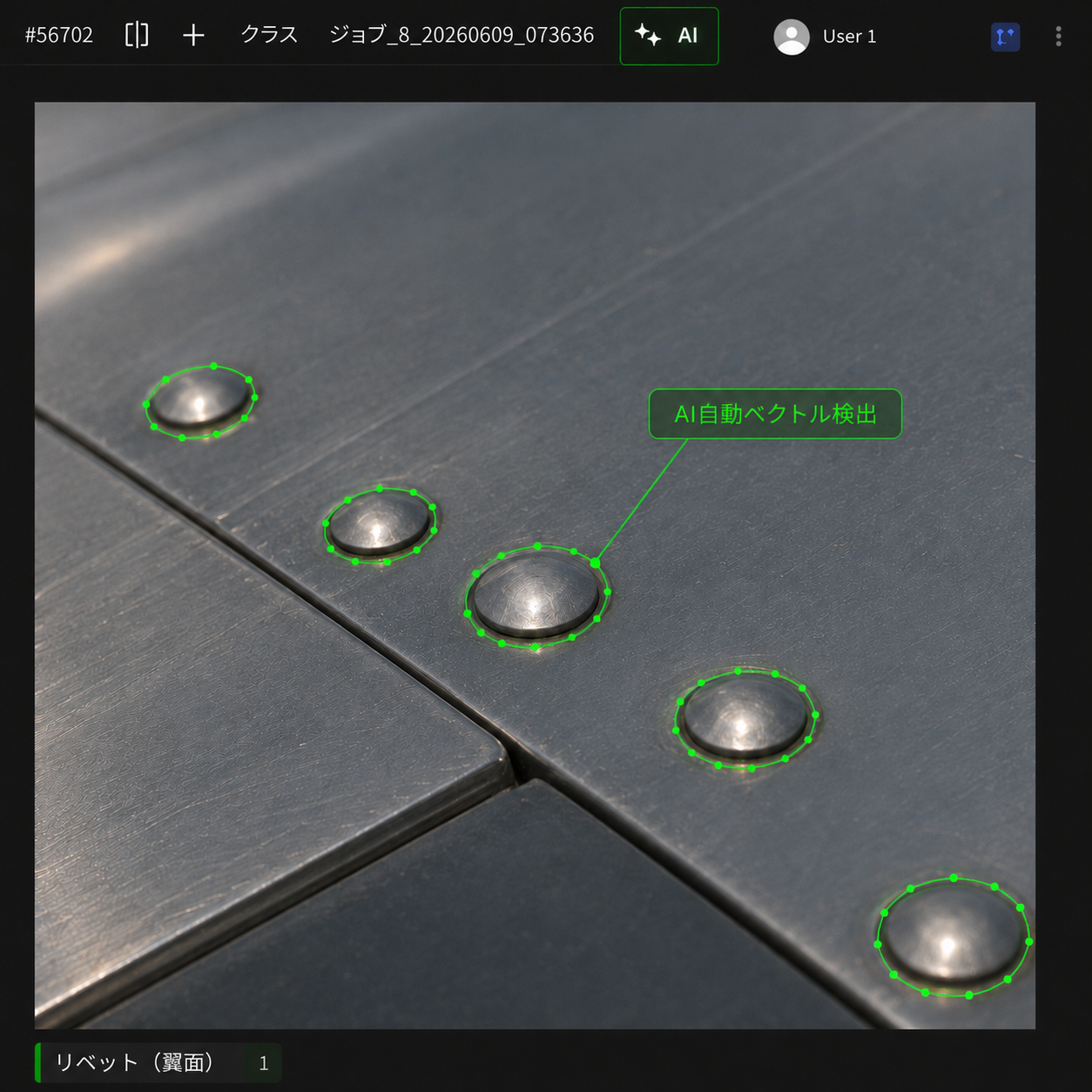
Beyond rectangular bounding boxes, detect objects with vector polygons that adjust via control knobs.
Fit annotations precisely to an object's contour by simply dragging the knobs.

MobiStudio object detection with vector polygons (AI auto vector estimation, knob-adjustable)

Knob-Adjustable Polygons

Drag the knobs placed at each vertex to freely adjust the polygon shape, fitting it precisely to the object's contour.

AI Auto Vector Estimation

AI detects the object and auto-generates a vector polygon. Just fine-tune it for a high-precision annotation.

Contour-Accurate Detection

Complex shapes that rectangles can't capture are detected accurately with vector polygons — ideal for inspection and measurement use cases.

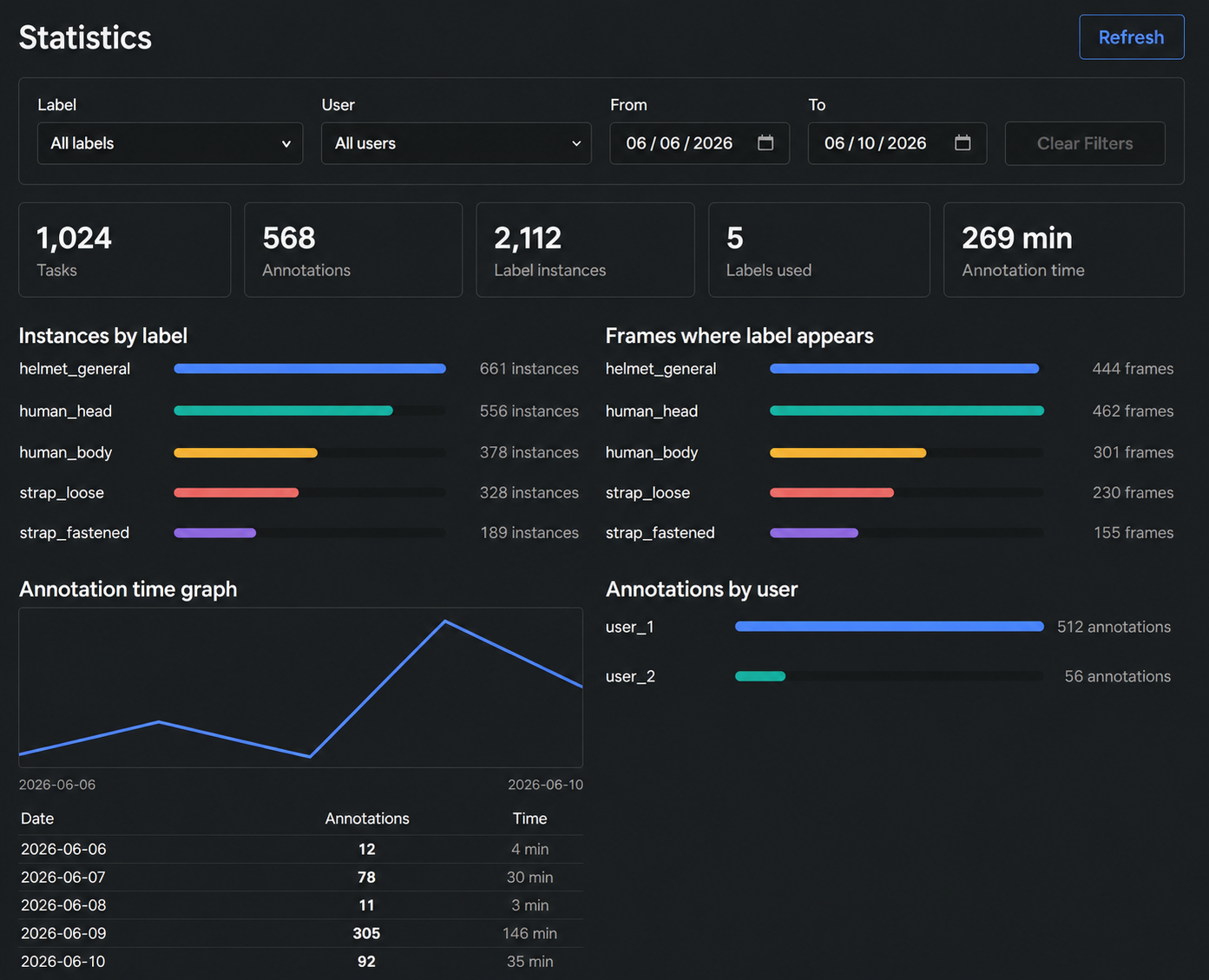
STATISTICS Work Statistics Dashboard

Visualize project progress, individual annotation counts, and quality metrics in real time.
Enables data-driven project management.

Project Progress

Real-time display of overall completion rate and remaining tasks. Supports deadline management.

Individual Performance

Compare and analyze annotation count, speed, and quality scores for each team member.

Quality Monitoring

Track quality metrics such as agreement rates and correction rates, ensuring consistency of annotation standards.

MobiStudio statistics dashboard screen

ORGANIZATION Organization Management

Control project access permissions with a hierarchical structure of admins, sub-admins, and workers.
Clearly define who can do what and safely manage collaboration in large teams.

Admin
Full permissions / Project creation & editing
Sub-Admin
Project management / Member supervision
Sub-Admin
Statistics review / Quality management
Worker
Annotation execution
Worker
Annotation execution
Worker
Annotation execution

Permission Management

Control project creation and editing permissions by role. Eliminates the risk of workers accidentally modifying project settings.

Annotation Performance Tracking

View annotation counts per member in real time. Use for adjusting work allocation and managing progress.

COMPARISON Comparison with Conventional Tools

Typical Labeling Tools MobiStudio
Fixed UI: Compromises needed to fit the project Fully customizable UI, optimized for your workflow
All manual annotation: Enormous time and cost AI assist kicks in midway, 80% workload reduction
Training in a separate tool: Workflow fragmentation Annotation + training unified in one platform
Progress management requires manual compilation Automatic visualization via statistics dashboard
Insufficient permission management Hierarchical control: Admin / Sub-admin / Worker

CUSTOM TOOLS Request via Ticket, Custom Tools in 24 Hours

Request the tools you need directly from our dev team via a ticket system.
We implement custom tools tailored to your work and deliver them in as little as 24 hours.

Request Directly to Developers

Request the tools or features you need straight from the dev team through the ticket system — your needs reach us in your own words.

Implemented in as Little as 24 Hours

For example, a lasso tool or a hexagon polygon with control knobs — we quickly add tools for specific shapes.

Shape-Specific Custom Tools

Build dedicated annotation tools tailored to your target objects — knob-adjustable polygons and more, extended to your field's requirements.

Examples of Custom Tools

  • Lasso tool — quickly enclose complex contours with a freehand curve
  • Hexagon polygon with control knobs — fit specific shapes precisely, fine-tune with knobs
  • Fill / selection tools specialized for your target objects

Make annotation work faster and smarter.

We welcome consultation and demo requests for MobiStudio implementation.
We will propose the optimal plan for your project scale.

Request Demo / Contact